Pac-Man is a classic platform game that is probably known by everyone today. The name “Pac-Man” comes from the Japanese word “paku,” which means opening and closing the mouth. The creator, Toru Iwatani, was inspired by a Japanese story about a creature that protects children from monsters by eating them. In creating the game, he used key words from the story as a springboard, and the verb “eat” became the foundation of everything.
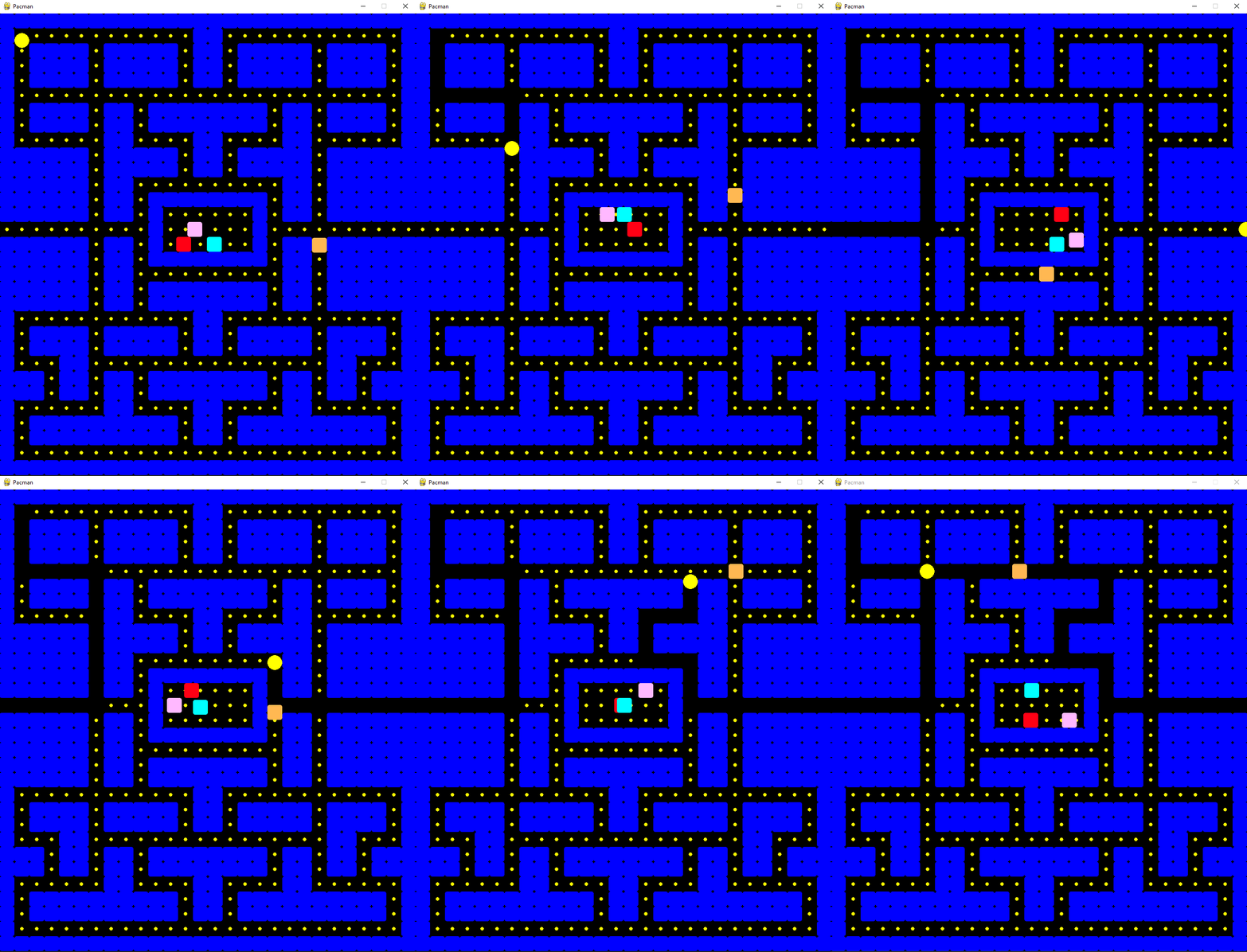 You will have created this with me by the end of this article!
The monsters are represented as four ghosts that attack the player in successive waves, similar to Space Invaders. Each ghost also has a unique personality. In the story, there is one more important element, the concept of life force “kokoro,” which allowed the creatures to eat monsters. In the game, this energy is represented as power-up cookies that give Pac-Man a short-term ability to eat monsters.
In the tutorial, I will first guide you through basic setup, then we will create game objects for the maze wall, Pac-Man and ghosts, ensure pathfinding through the maze, give the ghosts random movement, implement arrow controls for the player, and finally, place food in the form of cookies throughout the maze. I will accompany everything with images and GIFs for better representation.
You will have created this with me by the end of this article!
The monsters are represented as four ghosts that attack the player in successive waves, similar to Space Invaders. Each ghost also has a unique personality. In the story, there is one more important element, the concept of life force “kokoro,” which allowed the creatures to eat monsters. In the game, this energy is represented as power-up cookies that give Pac-Man a short-term ability to eat monsters.
In the tutorial, I will first guide you through basic setup, then we will create game objects for the maze wall, Pac-Man and ghosts, ensure pathfinding through the maze, give the ghosts random movement, implement arrow controls for the player, and finally, place food in the form of cookies throughout the maze. I will accompany everything with images and GIFs for better representation.
» basic_settings
The resulting game has approximately 300 lines of code, so I am only listing the most important parts here. The full code is available on my GitHub repository. The first step is to install the necessary packages. We will need pygame, numpy, and tcod. Install all of them using the pip tool (you can find out how to do this in the article about Python applications). If you are using an IDE like PyCharm (I recommend it), the installation will occur after clicking on the missing package error message. First, we will create a game window, in a similar way to the previous tutorial on the Space Invaders game (which had only 100 lines). Here, I will prepare the parameters for specifying the window size, game name, refresh rate, and several data fields that will hold references to game objects and the player. The tick function iteratively goes through all the game objects and calls their internal logic and rendering. Then all that remains is to redraw the entire game area and handle input events such as mouse clicks and keyboard input. The _handle_events function will serve this purpose.
import pygame # import packages (install with "pip install pygame" in cmd)
import numpy as np
import tcod
class GameRenderer:
    def __init__(self, in_width: int, in_height: int):
        pygame.init()
        self._width = in_width
        self._height = in_height
        self._screen = pygame.display.set_mode((in_width, in_height))
        pygame.display.set_caption('Pacman')
        self._clock = pygame.time.Clock()
        self._done = False
        self._game_objects = []
        self._walls = []
        self._cookies = []
        self._hero: Hero = None
    def tick(self, in_fps: int):
        black = (0, 0, 0)
        while not self._done:
            for game_object in self._game_objects:
                game_object.tick()
                game_object.draw()
            pygame.display.flip()
            self._clock.tick(in_fps)
            self._screen.fill(black)
            self._handle_events()
         print("Game over")
    def add_game_object(self, obj: GameObject):
        self._game_objects.append(obj)
    def add_wall(self, obj: Wall):
        self.add_game_object(obj)
        self._walls.append(obj)
    def _handle_events(self):
        pass # we'll implement this later
» parent_game_object
Next, I am creating a parent game object called GameObject, from which other classes will inherit functionality. In the game, we will have objects for the wall (Wall), Pac-Man (Hero), ghosts (Ghost), and cookies (Cookie). For the movable game entities mentioned above, I will later create a class called MovableObject, which will be an extension of the GameObject class with movement functions. During object initialization, I specify its color, shape, and position. Each object also has a reference to the rendering surface _surface, so that it can take care of its own rendering on the main surface. We have a function called draw for this purpose, which is called by the previously created GameRenderer for each game object. Depending on the is_circle parameter, the object is either rendered as a circle or as a rectangle (in our case, I am using a square with slightly rounded corners for the walls and a circle for Pac-Man and cookies).
class GameObject:
    def __init__(self, in_surface, x, y,
                 in_size: int, in_color=(255, 0, 0),
                 is_circle: bool = False):
        self._size = in_size
        self._renderer: GameRenderer = in_surface
        self._surface = in_surface._screen
        self.y = y
        self.x = x
        self._color = in_color
        self._circle = is_circle
        self._shape = pygame.Rect(self.x, self.y, in_size, in_size)
    def draw(self):
        if self._circle:
            pygame.draw.circle(self._surface,
                               self._color,
                               (self.x, self.y),
                               self._size)
        else:
            rect_object = pygame.Rect(self.x, self.y, self._size, self._size)
            pygame.draw.rect(self._surface,
                             self._color,
                             rect_object,
                             border_radius=4)
    def tick(self):
        pass
Creating the wall class will be simple. I choose the color blue for the walls according to the original Pac-Man (color parameter — Blue 255, rest 0).
class Wall(GameObject):
    def __init__(self, in_surface, x, y, in_size: int, in_color=(0, 0, 255)):
        super().__init__(in_surface, x * in_size, y * in_size, in_size, in_color)
The code for rendering and the object for the walls is prepared. When writing, make sure that the Wall and GameObject classes are above the GameRenderer class so that the class “sees” them. The next step is to render the maze on the screen. But before that, we have to create one helper class.
» the_game_controller_class
I will save the maze in ASCII characters in a variable in the new PacmanGameController class. I will use the original maze size — 28x31 tiles. Later, I will have to ensure that the ghosts can correctly find their way through the maze and potentially find the player. First, I will read the maze as characters and convert it to a matrix of ones and zeros, where the wall is zero and the passable space is one. These values serve the pathfinding algorithm as a so-called cost function. Zero signifies an infinite cost of passage, so items in the array marked this way will not be considered passable. Note the reachable_spaces array, which holds the passable parts of the maze. But more on that later, first I have to prepare the class structures. You can copy the maze in ASCII form from my GitHub. In the character notation, I used “X” for the wall, “P” for Pac-Man, and “G” for the ghost.
class PacmanGameController:
    def __init__(self):
        self.ascii_maze = [
            "XXXXXXXXXXXXXXXXXXXXXXXXXXXX",
            "XP           XX            X",
            "X XXXX XXXXX XX XXXXX XXXX X",
            "X XXXX XXXXX XX XXXXX XXXX X",
            "X XXXX XXXXX XX XXXXX XXXX X",
            "X                          X",
            "X XXXX XX XXXXXXXX XX XXXX X",
            "X XXXX XX XXXXXXXX XX XXXX X",
            "X      XX    XX    XX      X",
            "XXXXXX XXXXX XX XXXXX XXXXXX",
            "XXXXXX XXXXX XX XXXXX XXXXXX",
            "XXXXXX XX          XX XXXXXX",
            "XXXXXX XX XXXXXXXX XX XXXXXX",
            "XXXXXX XX X   G  X XX XXXXXX",
            "          X G    X          ",
            "XXXXXX XX X   G  X XX XXXXXX",
            # shortened for article, full ascii on my github
            "XXXXXXXXXXXXXXXXXXXXXXXXXXXX",
        ]
        self.numpy_maze = []
        self.cookie_spaces = []
        self.reachable_spaces = []
        self.ghost_spawns = []
        self.size = (0, 0)
        self.convert_maze_to_numpy()
        #self.p = Pathfinder(self.numpy_maze) # use later
    def convert_maze_to_numpy(self):
        for x, row in enumerate(self.ascii_maze):
            self.size = (len(row), x + 1)
            binary_row = []
            for y, column in enumerate(row):
                if column == "G":
                    self.ghost_spawns.append((y, x))
                if column == "X":
                    binary_row.append(0)
                else:
                    binary_row.append(1)
                    self.cookie_spaces.append((y, x))
                    self.reachable_spaces.append((y, x))
            self.numpy_maze.append(binary_row)
» rendering_the_maze
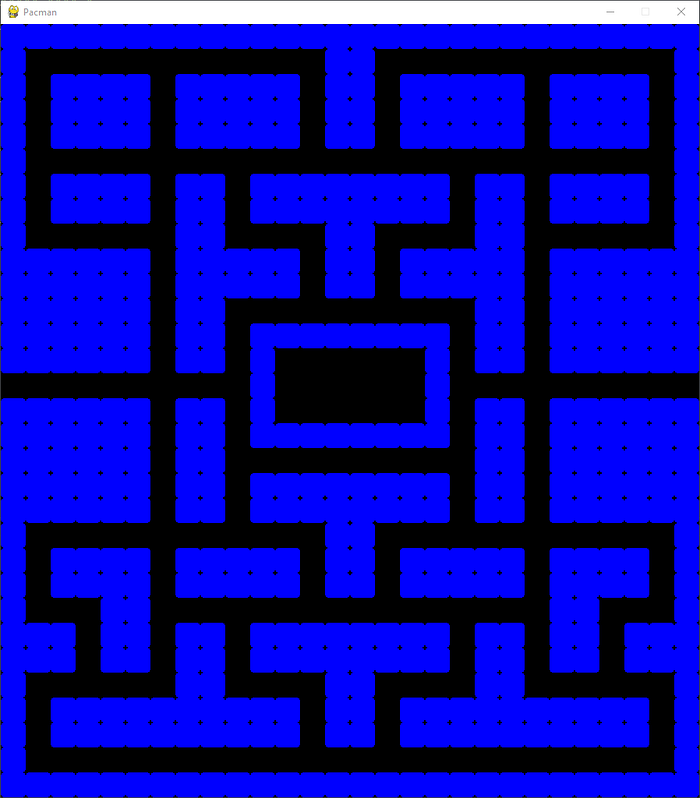
Everything necessary for rendering the maze is prepared, so all that remains is to create instances of our PacmanGameController classes, go through the 2D array with wall positions, and create a Wall object at these locations (I am using the add_wall function, which is not shown here, again, take a look at the full code on my GitHub). I set the refresh rate to 120 frames per second.
if __name__ == "__main__":
    unified_size = 32
    pacman_game = PacmanGameController()
    size = pacman_game.size
    game_renderer = GameRenderer(size[0] * unified_size, size[1] * unified_size)
    for y, row in enumerate(pacman_game.numpy_maze):
        for x, column in enumerate(row):
            if column == 0:
                game_renderer.add_wall(Wall(game_renderer, x, y, unified_size))
    game_renderer.tick(120)
» let’s_add_ghosts!
In the original Pac-Man, there were four ghosts named Blinky, Pinky, Inky, and Clyde, each with their own individual character and abilities. The concept of the game is based on a Japanese fairy tale (more here and here) and the original names in Japanese also suggest their abilities (e.g. Pinky has the Japanese name Thief, Blinky is Shadow). However, for our game, we will not go into such detail and each ghost will use only the basic behavioral loop like in the original — i.e. the Chase, Scatter, and Frightened modes. We will describe and process these AI modes in the second part. The ghost class will be simple, inheriting most of its behavior from the parent MovableObject class (check my GitHub, that class is slightly more complex and includes logic for movement in four directions, following a route, and checking for collisions with walls).
class Ghost(MovableObject):
    def __init__(self, in_surface, x, y, in_size: int, in_game_controller, in_color=(255, 0, 0)):
        super().__init__(in_surface, x, y, in_size, in_color, False)
        self.game_controller = in_game_controller
I will add RGB values for the colors of each ghost to the PacmanGameController class and generate four colorful ghosts in the main function. I will also prepare a static function for coordinate conversion, which simply converts maze coordinates (e.g. x=16 y=16 is approximately the center of the maze, and multiplying by the size of the cell, or tile, gives me a coordinate on the game surface in pixels).
# inPacmanGameController
self.ghost_colors = [
        (255, 184, 255),
        (255, 0, 20),
        (0, 255, 255),
        (255, 184, 82)
    ]
# in main
for i, ghost_spawn in enumerate(pacman_game.ghost_spawns):
    translated = translate_maze_to_screen(ghost_spawn)
    ghost = Ghost(game_renderer, translated[0], translated[1], unified_size, pacman_game,
                  pacman_game.ghost_colors[i % 4])
    game_renderer.add_game_object(ghost)
# General functions for coordinate conversion, place at the beginning of the code
def translate_screen_to_maze(in_coords, in_size=32):
    return int(in_coords[0] / in_size), int(in_coords[1] / in_size)
def translate_maze_to_screen(in_coords, in_size=32):
    return in_coords[0] * in_size, in_coords[1] * in_size
At this stage, the four ghosts will be rendered in the maze upon launching the game. We now want to make them move.
» maze_pathfinding
Now comes the possibly most complex part. Finding a path in a 2D space or graph is a difficult problem. Implementing an algorithm to solve such a problem would take another article, so we will use a ready-made solution. The most efficient algorithm for pathfinding is the A* algorithm. This is provided by the tcod package that we installed at the beginning.
In order to move the ghosts, I will create a class called Pathfinder. In the constructor, I will initialize a numpy array with the cost of passing through (an array of ones and zeros described earlier) and create a class variable pf which will hold an instance of the A* pathfinder. The get_path function will then calculate and return the path as a series of steps in an array when called with coordinates in the maze (from where, to where).
class Pathfinder:
    def __init__(self, in_arr):
        cost = np.array(in_arr, dtype=np.bool_).tolist()
        self.pf = tcod.path.AStar(cost=cost, diagonal=0)
    def get_path(self, from_x, from_y, to_x, to_y) -> object:
        res = self.pf.get_path(from_x, from_y, to_x, to_y)
        return [(sub[1], sub[0]) for sub in res]
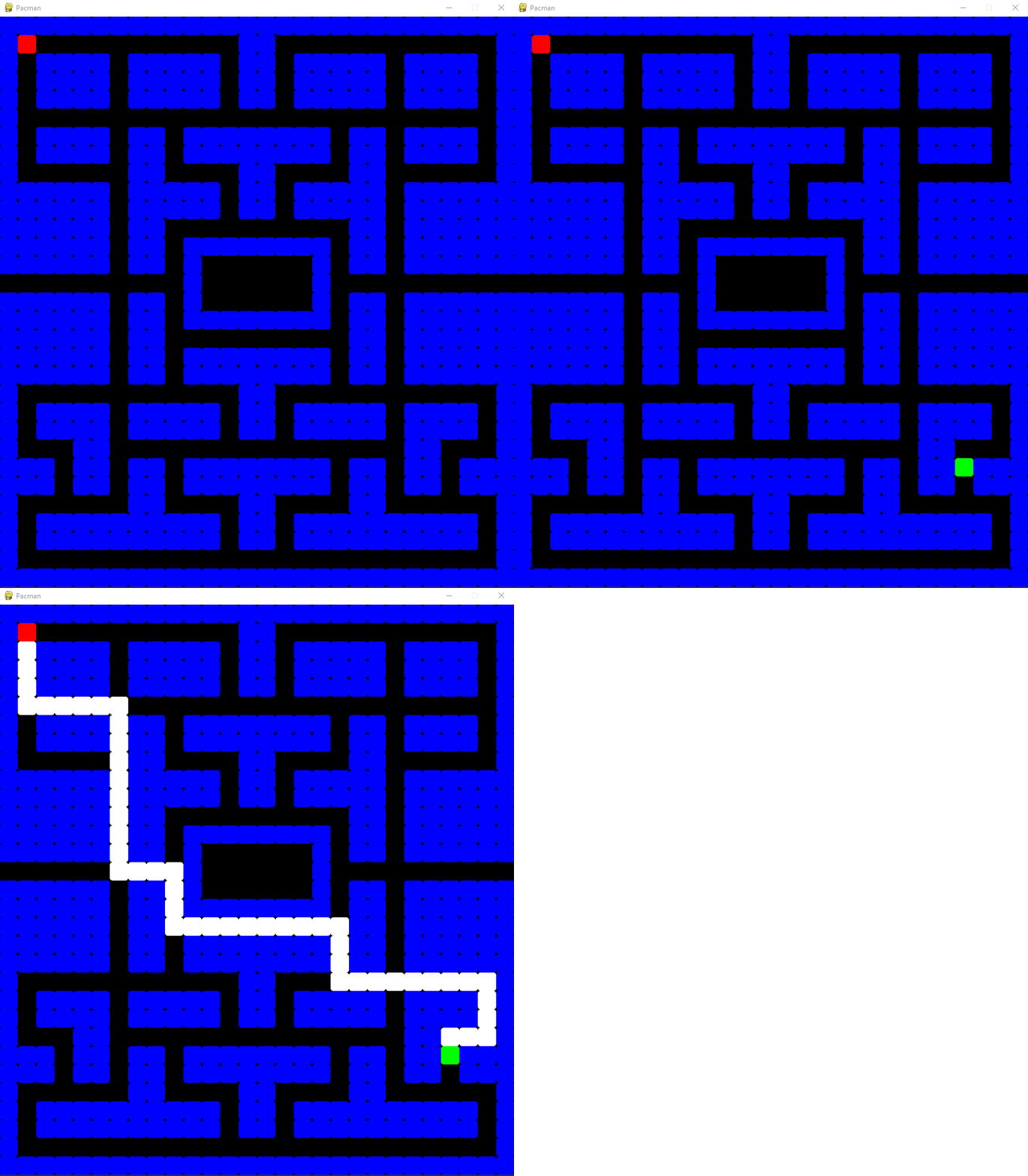
I will now add a section to the main function to demonstrate pathfinding. I choose the starting coordinates [1,1] and the destination of the route [24,24]. This is optional code.
# draw path - optional
red = (255, 0, 0)
green = (0, 255, 0)
_from = (1, 1)
_to = (24, 24)
path_array = pacman_game.p.get_path(_from[1], _from[0], _to[1], _to[0])
print(path_array)
# [(1, 2), (1, 3), (1, 4), (1, 5), (2, 5), (3, 5), (4, 5), (5, 5), (6, 5), (6, 6), (6, 7) ...
white = (255, 255, 255)
for path in path_array:
    game_renderer.add_game_object(Wall(game_renderer, path[0], path[1], unified_size, white))
from_translated = translate_maze_to_screen(_from)
game_renderer.add_game_object(
    GameObject(game_renderer, from_translated[0], from_translated[1], unified_size, red))
to_translated = translate_maze_to_screen(_to)
game_renderer.add_game_object(
    GameObject(game_renderer, to_translated[0], to_translated[1], unified_size, green))
In the game, rendering the shortest route looks like this:
» randomized_ghost_movement
Now, we are going to create a new function in the PacmanGameController class for selecting a random point from the reachable_spaces array. Each ghost will use this function after it reaches its destination. This way, the ghosts will simply choose a path from their current position in the maze to a random destination indefinitely. We will implement more complex behavior, such as chasing and fleeing the player, in the next part.
def request_new_random_path(self, in_ghost: Ghost):
    random_space = random.choice(self.reachable_spaces)
    current_maze_coord = translate_screen_to_maze(in_ghost.get_position())
    path = self.p.get_path(current_maze_coord[1], current_maze_coord[0], random_space[1],
                           random_space[0])
    test_path = [translate_maze_to_screen(item) for item in path]
    in_ghost.set_new_path(test_path)
In the Ghost class, we add new logic for following a path. The function reached_target is called every frame and checks whether the ghost has already reached its target. If it has, it determines in which direction the next step of the path through the maze is and starts changing its position either up, down, left, or right (the logic for movement is called in the parent MovableObject class).
def reached_target(self):
    if (self.x, self.y) == self.next_target:
        self.next_target = self.get_next_location()
    self.current_direction = self.calculate_direction_to_next_target()
def set_new_path(self, in_path):
    for item in in_path:
        self.location_queue.append(item)
    self.next_target = self.get_next_location()
def calculate_direction_to_next_target(self) -> Direction:
    if self.next_target is None:
        self.game_controller.request_new_random_path(self)
        return Direction.NONE
    diff_x = self.next_target[0] - self.x
    diff_y = self.next_target[1] - self.y
    if diff_x == 0:
        return Direction.DOWN if diff_y > 0 else Direction.UP
    if diff_y == 0:
        return Direction.LEFT if diff_x < 0 else Direction.RIGHT
    self.game_controller.request_new_random_path(self)
    return Direction.NONE
def automatic_move(self, in_direction: Direction):
    if in_direction == Direction.UP:
        self.set_position(self.x, self.y - 1)
    elif in_direction == Direction.DOWN:
        self.set_position(self.x, self.y + 1)
    elif in_direction == Direction.LEFT:
        self.set_position(self.x - 1, self.y)
    elif in_direction == Direction.RIGHT:
        self.set_position(self.x + 1, self.y)
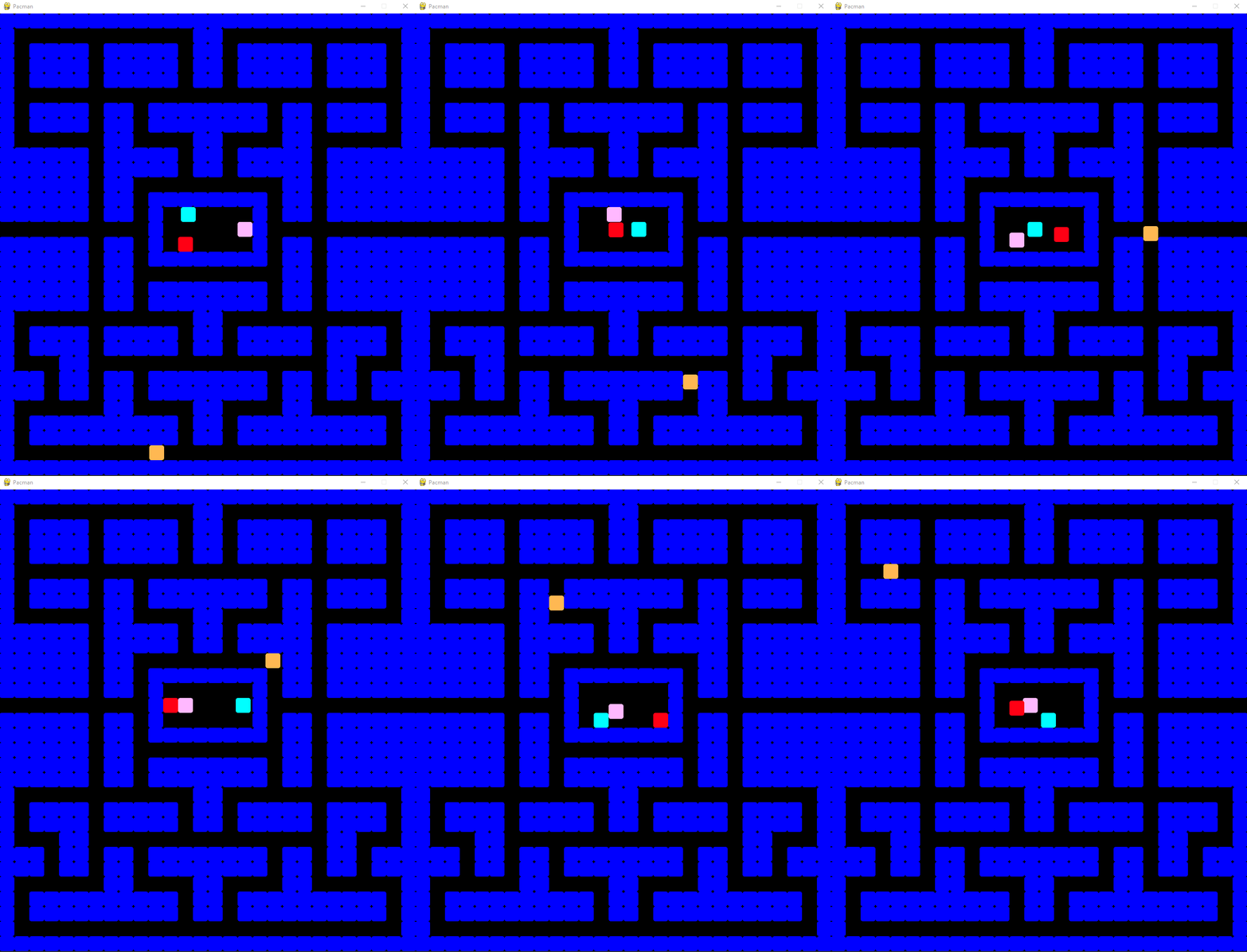
The ghosts are now created at the positions indicated by the letter “G” in the original ASCII maze and begin to search for a random path. I have locked three ghosts in the cage — as in the original Pacman, they will be released one by one — and one is wandering through the maze:
» player_controls
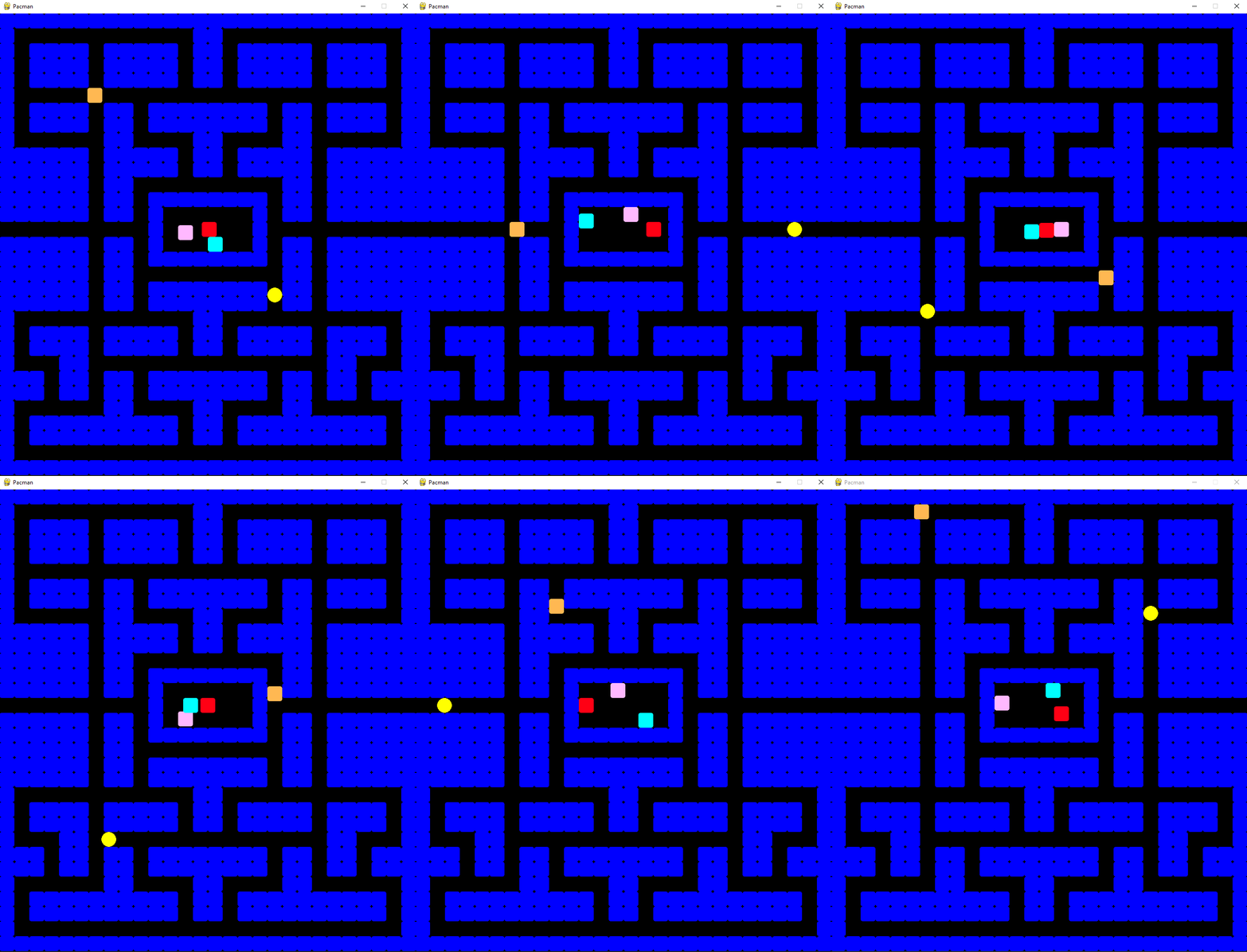
To add player functionality, I will create a class called Hero. Most of the logic for controlling both the player and the ghosts is handled in the MovableObject class, so we only need a few functions to specify the behavior of the player. In the original Pacman, the player can move in four directions, controlled by the arrow keys. If no arrow key is pressed, the player will continue in the last valid direction. If a key is pressed in a direction that the player cannot move, the direction is saved and used at the next available turn. I will replicate this behavior in our game and also added Pacman’s ability to teleport from one end of the maze to the other — I will just check if the player is outside the game area on the left or right side and set their position to the opposite side of the maze accordingly. Pacman also has a modified rendering function, we need to render it with half the size it would normally take up as a square (using pygame.rect).
class Hero(MovableObject):
    def __init__(self, in_surface, x, y, in_size: int):
        super().__init__(in_surface, x, y, in_size, (255, 255, 0), False)
        self.last_non_colliding_position = (0, 0)
    def tick(self):
        # TELEPORT
        if self.x < 0:
            self.x = self._renderer._width
        if self.x > self._renderer._width:
            self.x = 0
        self.last_non_colliding_position = self.get_position()
        if self.check_collision_in_direction(self.direction_buffer)[0]:
            self.automatic_move(self.current_direction)
        else:
            self.automatic_move(self.direction_buffer)
            self.current_direction = self.direction_buffer
        if self.collides_with_wall((self.x, self.y)):
            self.set_position(self.last_non_colliding_position[0], self.last_non_colliding_position[1])
        self.handle_cookie_pickup()
    def automatic_move(self, in_direction: Direction):
        collision_result = self.check_collision_in_direction(in_direction)
        desired_position_collides = collision_result[0]
        if not desired_position_collides:
            self.last_working_direction = self.current_direction
            desired_position = collision_result[1]
            self.set_position(desired_position[0], desired_position[1])
        else:
            self.current_direction = self.last_working_direction
    def handle_cookie_pickup(self):
        collision_rect = pygame.Rect(self.x, self.y, self._size, self._size)
        cookies = self._renderer.get_cookies()
        game_objects = self._renderer.get_game_objects()
        for cookie in cookies:
            collides = collision_rect.colliderect(cookie.get_shape())
            if collides and cookie in game_objects:
                game_objects.remove(cookie)
    def draw(self):
        half_size = self._size / 2
        pygame.draw.circle(self._surface, self._color, (self.x + half_size, self.y + half_size), half_size)
I instantiate the Hero class at the end of the main function. I set the position to the coordinates [1,1] — unified_size is the size of one tile. We also need to add processing of input events to the GameRenderer class so that we can control the game character.
# in GameRenderer class
def add_hero(self, in_hero):
        self.add_game_object(in_hero)
        self._hero = in_hero
def _handle_events(self):
    for event in pygame.event.get():
        if event.type == pygame.QUIT:
            self._done = True
    pressed = pygame.key.get_pressed()
    if pressed[pygame.K_UP]:
        self._hero.set_direction(Direction.UP)
    elif pressed[pygame.K_LEFT]:
        self._hero.set_direction(Direction.LEFT)
    elif pressed[pygame.K_DOWN]:
        self._hero.set_direction(Direction.DOWN)
    elif pressed[pygame.K_RIGHT]:
        self._hero.set_direction(Direction.RIGHT)
# at the end of main function
pacman = Hero(game_renderer, unified_size, unified_size, unified_size)
game_renderer.add_hero(pacman)
game_renderer.tick(120)
After launching the game now, we can control the player — Pacman!
» adding_cookies
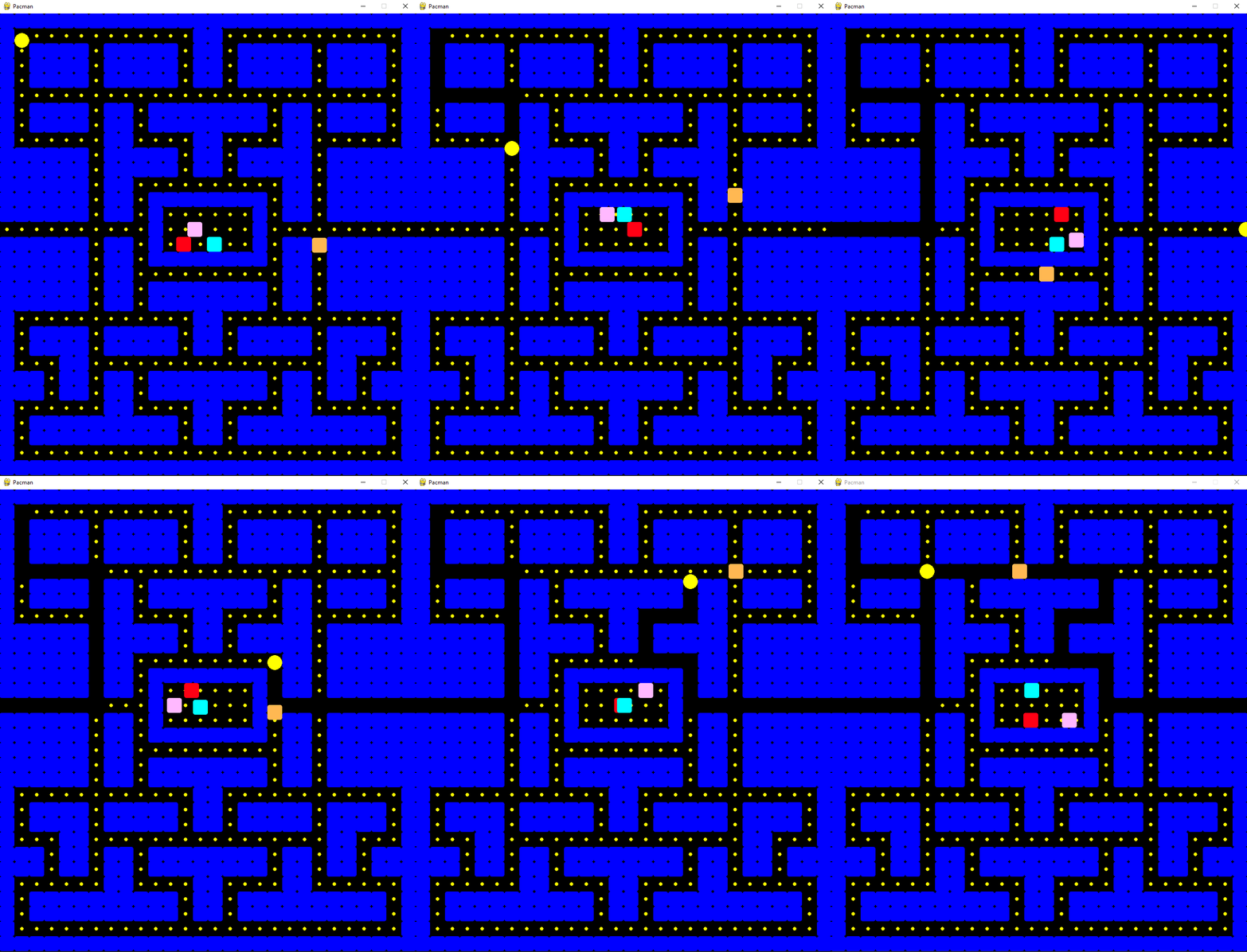
It wouldn’t be Pacman without cookies in the maze. From a gameplay perspective, they determine the degree of exploration of the world and some cookies even reverse the abilities of ghosts and Pacman. They are therefore the ultimate reward for players and the main indicator of their progress through levels. In today’s games, behavior that the game designer wants to encourage in the player is usually rewarded. A beautiful example is this year’s Elden Ring, where anyone who explores every corner of the world is rewarded. The more dangerous and remote, the greater the reward. On the other hand, games like the modern Assassin’s Creed support task completion, so you have the feeling while playing that you are working, not playing. Adding cookies will be the easiest thing in the entire tutorial, and that’s why I saved it for the end, as the cherry on top. I will create a class called Cookie. Its instance will always be four pixels in size, yellow in color, and circular in shape. In the main function, I will create cookies on all tiles that we saved in the cookie_spaces array (the same as reachable_spaces) at the beginning. I will add a function called handle_cookie_pickup to the player, in which I constantly check whether the player is colliding with any cookie. If that is the case, I will remove the cookie from the array and it will no longer be rendered.
class Cookie(GameObject):
    def __init__(self, in_surface, x, y):
        super().__init__(in_surface, x, y, 4, (255, 255, 0), True)
# in GameRenderer class
def add_cookie(self, obj: GameObject):
        self._game_objects.append(obj)
        self._cookies.append(obj)
# in Hero class
def handle_cookie_pickup(self):
    collision_rect = pygame.Rect(self.x, self.y, self._size, self._size)
    cookies = self._renderer.get_cookies()
    game_objects = self._renderer.get_game_objects()
    for cookie in cookies:
        collides = collision_rect.colliderect(cookie.get_shape())
        if collides and cookie in game_objects:
            game_objects.remove(cookie)
# in main function:
for cookie_space in pacman_game.cookie_spaces:
    translated = translate_maze_to_screen(cookie_space)
    cookie = Cookie(game_renderer, translated[0] + unified_size / 2, translated[1] + unified_size / 2)
    game_renderer.add_cookie(cookie)
And now for the result of our efforts:
 A little interesting fact for the end — in the original game, Pacman stops for one frame after eating each cookie, so the ghosts can more easily catch him at the beginning of the game when the field is still full. In the next part, we will implement similar game mechanics and you can also look forward to artificial intelligence for the ghosts, score tracking, sounds, animations, textures, power-ups, screen-shake effects, lives, and end game states.
If you’ve found my article interesting, you may be also interested in my game development course for beginners:
https://www.udemy.com/course/make-a-3d-game-in-unity-2020-from-scratch-with-free-assets/?referralCode=8B96F6C67527AEEA39D9
A little interesting fact for the end — in the original game, Pacman stops for one frame after eating each cookie, so the ghosts can more easily catch him at the beginning of the game when the field is still full. In the next part, we will implement similar game mechanics and you can also look forward to artificial intelligence for the ghosts, score tracking, sounds, animations, textures, power-ups, screen-shake effects, lives, and end game states.
If you’ve found my article interesting, you may be also interested in my game development course for beginners:
https://www.udemy.com/course/make-a-3d-game-in-unity-2020-from-scratch-with-free-assets/?referralCode=8B96F6C67527AEEA39D9